


Few things stir up a room full of parents more than the great kiddie compensation debate: Should kids get paid for chores?
No, never!
Yes, of course!
Maybe — it depends on the task.
Few things stir up a room full of parents more than the great kiddie compensation debate: Should kids get paid for chores?
No, never!
Yes, of course!
Maybe — it depends on the task.
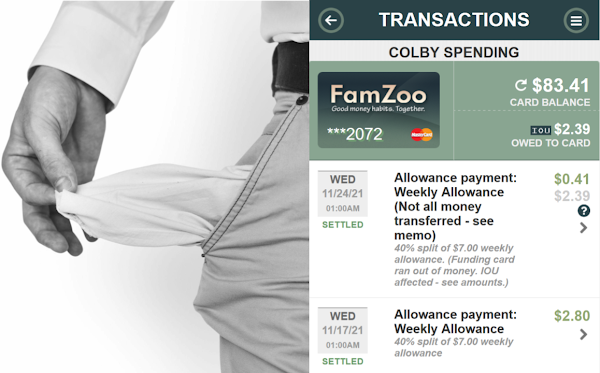
It’s bound to happen eventually.
Payday rolls around for the kids, and suddenly you realize you’re short of funds on your parent card. Oops!
The last thing you want to do is stiff your own kid.
No worries. We’ve got your kid’s back. No need for you to remember your missed payments or record them elsewhere. FamZoo automatically tracks all shortfalls in parent payments — like allowance, chore rewards, interest, reimbursements, etc.

Recently, Coralee asked the Parent Community:
“Is there an option for kids to ‘bid’ on chores in FamZoo? My kids have decided we should do this (based on the show, ‘No Good Nick’). I was thinking it would be great if there was a way for the kids to electronically (secretly) send their bids to the parents, and then the parent could select and award the chore to the lowest bidder.”
Cool idea! My suggestion: use a chore checklist coupled with money requests.
Here’s how...

What happens to a chore that is never checked off? (You know, like every lonely chore ever assigned to a rebellious teen.😬)
In FamZoo, the neglected chore either hangs around forever or expires.
For a chore to expire, you must explicitly provide an expiration timeframe when setting up the chore. Look for the Expires setting when creating or editing your chore checklist item. Fill in the number of days after the due date when expiration should occur.
Without expiration settings, neglected chores can really pile up on your checklists, causing important upcoming chores to get buried in the “All Open” view.

Kim B. sparked the hot discussion in the parent community this month with this question:
“I’m curious how your kids earn money. I feel like dishes, bathrooms, etc. are just part of living here, so I don’t want to pay them for it. But I’m struggling to find ways for them to earn money.”
Scores of parents weighed in with a diverse set of ideas.
“Opportunity is missed by most people because it is dressed in overalls and looks like work.”
~Thomas Edison
Is your child passing up opportunities to earn a few extra bucks around the house?
You: “I’ve put together a list of odd jobs above and beyond your unpaid chores. The amount I’ll pay you is next to each one. See? Like $4 to wash my car. Whaddya say?”
Your kid: “Nah, I’ll pass. Doesn’t seem worth it.”
Sounds like it’s time to set up a Money-You-Could-Have-Earned account. It’s a way to teach your kid that a few dollars here and there add up to significant dollars over time — especially when you factor in forgone compound interest.
Here’s how the system works in FamZoo (but you could do the same thing manually with a spreadsheet or even a notebook):

Your kids know how to stack blocks, but do they know how to stack bills? How about 100 dollar bills? You know, the “Benjamins.”
They will if you listen to last Friday’s episode of the popular personal finance podcast Stacking Benjamins. The host, Joe Saul-Sehy, invited me to join fellow panelists Len Penzo and Tai McNeely in a lively round-table discussion on teaching kids good money habits. Joe plucked a range of topics from three recent articles.
Here’s an outline of the discussion with the 29 key points and tips. Check out the timeline if you want to jump right to your favorite spots in the podcast:
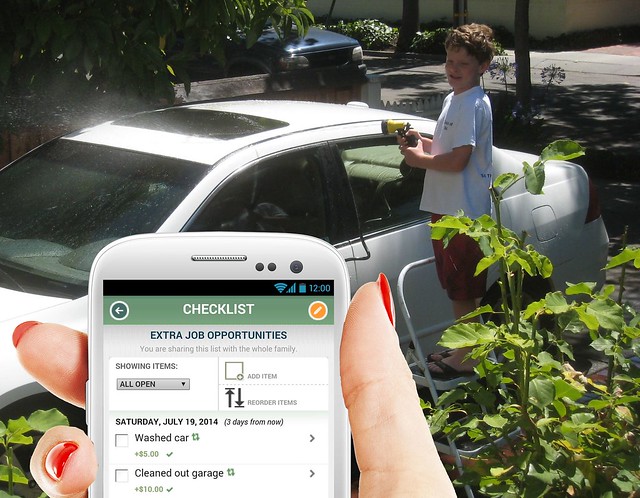

Diane, a FamZoo mom, sent us the following question:
I would like to just supply a list of chores (with an associated value) that my kids can do whenever they want and do them multiple times. So, I would put ‘one load of laundry=$2.00’ and each time they do a load of laundry they would get $2.00 deposited. They might do two loads one day, none the next, one the day after, etc. Is there a way to accommodate this?
Setting up a checklist of optional extra jobs that kids can knock off from time to time to earn some extra bucks is a popular technique among FamZoo families. Parents pull it off using the rewards, repeat frequency, and expiration options of FamZoo checklist items.
Here’s how you can set up Diane’s laundry job opportunities:
So you’re intrigued by the idea of using a fun, point-driven gaming experience to turn your youngsters into eager household workers. Kids doing chores without whining. What parent wouldn’t love that?
But you’re also drawn to the idea of using a virtual family banking system to teach your kids critical money management skills while they’re still young. “Start early,” experts admonish parents. Set your kids on an path to financial independence as soon as possible. What parent wouldn’t be on-board with that?
Why not do both?
It’s easy. Use ChoreMonster and FamZoo together to develop good earning, spending, saving, and giving habits. Parents can deliver monetary rewards for completed chores in ChoreMonster as deposits in FamZoo’s virtual family bank by crediting their kids’ IOU accounts or prepaid cards. The funds earned through chores serve as the basis for your kids to make real world spending, saving, and giving decisions. They’ll learn good money habits through hands-on practice and your ongoing guidance.
Here are the steps in a nutshell:
Let’s take a more detailed look at each step:
First, you’ll need to register your family on ChoreMonster. Visit ChoreMonster.com. Click on the Sign Up Now button, and fill in the parent registration form. You’ll be asked whether you’d like to upgrade to a paying plan. You can see the cost/benefit comparison in this screenshot of the membership page. You can always start with the free plan, and upgrade later if desired.

If you’re also new to FamZoo, you can learn about our virtual family banking system and sign up for a free trial here.
Create an account for each of your kids by choosing Add A Child from the drop down list at the top of the parent page. Fill in the form to assign your child an individual username and password.

Each registered child has three tabs on the parent dashboard: one for chores (the clock icon), one for rewards (the money bag icon), and one for settings (the pencil icon). Click the chore tab to add new chores for the currently selected child. You can review and edit existing chores on the same page.

Defining rewards works just like defining chores. Just click on the rewards tab (the money bag icon) to add a new reward and to browse or edit existing ones.
To add a monetary reward, decide how you want ChoreMonster points to map to real money. For example, 100 points in ChoreMonster might translate to a $1 deposit in FamZoo. If your child is racking up points rapidly, you may wish to add a few more monetary rewards at higher denominations (say, a $5 deposit for 500 points, a $10 deposit for 1,000 points, and so on).

As your kids perform chores, they sign into their ChoreMonster accounts to check off the completed items. The (alledgedly!) completed items go into the “Waiting for Mom/Dad” state until you explicitly approve the work to award the corresponding points.

You’ll get an email notification for each completed chore. Click on the link in the email to go to a page in the parent interface with a list of chores that need your review. You can approve completed chores individually or all at once.

As the completed chores are approved, kids rack up points. They can visit the Points & Rewards tab within the child interface to see what rewards can be redeemed for the current point total. Selecting a reward decreases the point balance and initiates a request to the parent for approval.

You’ll get an email notification for each reward requested by your child. Click on the link in the email to go to a page in the parent interface with a list of awards that need your confirmation. If you approve a monetary reward, deliver it by visiting FamZoo and making a credit for the indicated amount in your child’s account. If you’d like to split the deposit between multiple accounts — say, spending, saving, and giving — then look for the Split Credit link.
It would be cool if we could automate this deposit step so parents would not have to pop into FamZoo when delivering rewards. If you’d like to see that happen, then visit this discussion in the ChoreMonster support forum and give it a +1.

ChoreMonster helps parents teach kids the connection between hard work and rewards. As they build up earnings from their efforts, FamZoo encourages kids to spend wisely, save patiently, and give thoughtfully. Good habits are forged by consistent, hands-on experience.

Got young kids? Give the combination of ChoreMonster and FamZoo a try, and let us know what you think.
Got older kids? You might consider FamZoo’s built-in chore checklist capability with it’s calendar-centric interface, direct integration with the virtual family bank, chore penalty options (handy for the inevitable “TeenMonster” years!), and the trust-but-verify approach without explicit approvals. See here for more info.

I grew up watching my parents write personal checks at the store, and balancing their checkbooks every weekend at the kitchen table. The day I got my first checkbook was one of those rare “rite of passage” moments that made me feel a little more like an adult, but one thing I quickly realized was that I didn’t really understand how to manage my money properly or balance a checkbook, because I never learned and I was never taught. As a result of that experience I want to do all that I can to give my children the tools they need to succeed.
As parents we know that our kids have a lot to learn before they’re ready to venture out on their own, and it’s our responsibility to teach them those life lessons so they can be successful. One of the best lessons we can teach our kids before they get too old is how to manage their money properly. It’s a life lesson that can take a little bit of time for kids to grasp, so starting early is the best way to ensure they fully understand it before they’re out on their own.
Although there are many ways we can teach our kids money management one of my favorite methods is with “fake” check templates — click here or here for an example — because they allow for a hands on, tangible approach to money management that teaches more than just fake cash or piggy banks.

With a check template you’re able to teach your children all aspects of the check writing process. From filling out the appropriate “pay to the order of” information, to including the date, a memo, and a signature on the bottom, check templates allow you to go beyond the typical money management lesson by giving you the ability to break down each portion into a mini-lesson of its own. For example you can discuss the value of good handwriting and give your kids a fun way to practice. Another lesson you could teach is dollars and cents, how to calculate simple math in the head, and the importance of dates.
Not only can you teach these mini lessons but you can attach them to the overall goal of money management. By giving your kids a set of play checks you’re able to then pay them “play dollars”, for completing chores and other tasks, which they can stash in their piggy bank or deposit in their IOU account at a virtual family bank like FamZoo. Once they have enough play dollars saved up they’ll have the option to use their checkbook to buy rewards like extra TV time, new toys, or anything else you might decide.
Play checks are a fun exercise that gives you the ability to incorporate lessons for account monitoring, as well as checkbook balancing, so you can cover all the bases of money management at once. Unlike other lessons, this one can continue for days, weeks, months or even years. The more your kids practice, the better they’ll be. If they have a healthy respect for their earnings when they’re young it will be easy for them to carry that over to the real world when they’re older.
This was a guest post by Annie Harrington.
This is a guest post by FamZoo dad, Matt Fisher. Matt describes how he has customized the account, allowance, and chore settings in his virtual family bank to meet his family’s needs and match their values.

I’m an avid technologist (I’m one of those guys who was on the Internet before the WWW existed) so like so many other aspects of complicated modern life, I figured software could help. With a little Googling, I found a web application call FamZoo.com and decided to give it a whirl. Here are my thoughts on FamZoo and how I’ve set it for my family but don’t interpret this as a formal review — I make no attempt to be complete, objective, or compare to other software.
FamZoo, which I subconsciously refer to as Family Zoo (although their url is actually famzoo.com) is a web application that allows families to create allowance and savings plans that are as complicated or simple as they’d like. It allows kids to track what they’re owed in allowance, for all the times parents never actually have cash on hand. Very importantly too though, it allows you to create a checklist of chores with associated payments and deductions, so the kids can get credited for doing their chore and debited if they don’t. Additionally, it allows me to create multiple target accounts of money for them, such as free cash, savings, charitable donations, etc and split their allowance into those accounts to enforce savings. This allows me to enforce traditional methods such as “3 Jars” and the “50/30/20” rules that are suggested all over the Internet.
You can also define multiple income streams for the kids, which I took advantage of to set up a fixed weekly lunch allowance that goes straight into their lunch account. When setting up incomes, you have your choice of methods to use, and it provides a few calculators for common methods. For example, enter your kids’ birth dates, and FamZoo will automatically do the “buck a week per year of age” approach for you. So in net, you can define multiple inputs, and multiple outputs, each with separate rules — this is great flexibility that I took advantage of.
Some advanced features I appreciate include:
A note of caution: letting the kids control their own credits and debits opens Pandora’s box! A transaction audit log is provided, but in just 2 minutes my awesomely fast clicking son generated enough confusing unearned transactions that I had to go back and delete them. I’ve included more detail about this issue at the end of the post.
It quickly became apparent that the two most core concepts were: how to structure the accounts, and how to structure the corresponding chore checklists. For purposes of simplicity, and avoiding World War III, I’m keeping both structures identical for both kids.
This is what our account structure looks like:

The key goals here are:
I’m very proud of our household culture of giving (DD’s 11 year birthday gift request was donations to her favorite non-profit), and I like that FamZoo defaults this Charitable Giving category in. All of the categories are editable, by the way. In fact, pretty much everything you see in the application can be changed and customized.
The kids’ income is provided in two manners, and FamZoo makes a handy diagram that shows the flows:

Their lunch “income” is routed directly into their lunch account. As a description for this account, I added a note that they can keep any lunch money if they make and pack their own lunch, but not if they skip lunch at school. This was a little motivator I decided to use, as opposed to making it a “chore”. Kids don’t like chores.
Their weekly allowance, however, is split across the rest of the accounts to enforce best practices, as such:

This is basically a kid friendly modification of the 50/30/20 rules popular with some adults.
I feel like this is good structuring. The kids are pushed into saving a healthy amount of their money, but the majority of it is still in a general account that they can spend at will (much more generously than they’ll experience as adults!) I really like the ability to enforce these splits. While teaching the concept of money and earning is important, I think it’s really important to our economy to reinforce the concept of saving cash.
The chore management is just as important to me, though. We’ve never had a strongly regulated household for a variety of reasons, including less disciplined parenting than we would have liked as well as other really legitimate reasons. Therefore, I didn’t want to take too heavy a hand on chores. Nobody likes chores, and the more intelligent the kid, the more challenging it is to motivate them with menial work. I do want to leverage the “automatically make or lose money” capability of FamZoo, but not for everything. Plus, using the automatic credit/debit feature means interacting with FamZoo every time a chore is done, or risk automatically losing that pay.
With this in mind, I decided I do want a few things to be punched off every day, but that the majority of chores and behavior modifications should be treated more as opportunity, not requirement. So, I built a system of fixed allowance each week using the age method. This is a common suggestion on how much allowance to give, and the site will automatically calculate it for you based on your kid’s age.
Chores are scheduled on a regular basis, and include a credit and a debit. I don’t structure the credits and debits the same though. When the chore is completed and they log in and tick the box, that amount flows into their accounts according to the weekly allowance split. In other words, chore credits are automatically divided between general spending, long term savings, short term savings, and charity. A chore debit, however, is automatically incurred the day after an uncompleted chore is assigned, and comes directly from the child’s general spending account. In other words, the kids automatically lose money for not doing chores, and they lose directly from where it hurts — their spending. You could debit multiple accounts via splits as well, but I predict that the kids will view the enforced savings negatively, so deducting from there doesn’t really have much impact in terms of behavior modification. FamZoo does a great job of letting you decide which account, or which split method (you can define multiple split methods if you’d like) to choose when building a credit or a debit.
I have only a few chores — small, daily, easily accomplished things that will get them going and get them motivated. Everything else is either a bonus, or a penalty. Penalties are straightforward — behave poorly in some manner, and lose money directly from your general spending. Bonuses are structured in three ways:
Yes, I’m trying to make this look and feel like a video game.
The actual checklist looks like this:

I have additional bonuses for things like:
Some of these dollar amounts may look unreasonably high, but remember, I’m trying to create some serious behavior modification here, and I do enforce savings. Part of all this plan is that the kids are going to start paying for things I’ve traditionally paid for out of pocket, such as their cell phones, ongoing video game charges, riding lessons, electronics etc. With that considered I don’t think it’s unreasonable.
The kids reacted very well to the “few chores, but many potential bonuses” philosophy. At first DD was very glum when I started showing her the site, but when she realized that she only got penalized for a few basic chores, and the rest was all upside, she cheered right up! (Heh, I didn’t mention all the Metric 2 comp and mandatory cross-product goals yet...no wait, that’s MY job.)
DS reacted well also, agreeing that the few chores I did ask each day were pretty basic and easy. The chores were simply:
Easy peasy, and that was the goal.
Reported a defect: First of all, there’s a defect in changing chores from repeating chores to non-repeating. Basically it won’t work, and you’ll have to delete the repeating chores and key it back in. I already notified the FamZoo development group, and like a true software startup, one of the developers responded within an hour, on a Sunday night of a holiday weekend. Ah, startups, how I love to miss thee.
Today I logged in as an adult and deleted the automatic debits that occurred, since I wanted to give the kids a warm in period . By reminding them gently through the course of the day that they did have some chores to do, and that there were some big bonuses available, I got them to pick up laundry, take out trash and recycles, do dishes, and even spend a couple hours cleaning the house with me. DS even emptied all the trash cans and took the trash to the curb, willingly, cheerfully, quickly, for possibly the first time ever. His best friend was over all day for a lan party, which definitely had him in better moods though, so I can’t tell how much was the incentive plan, and how much was having his friend over.
As mentioned earlier on, I discovered another aspect of the software, which prompted me to change some settings. You can give the kids the ability to credit, debit and transfer funds between accounts themselves. This actually works as designed; if you check that box from within an account setting they can indeed add and remove funds, and transfer funds. The glitch is that they can literally add $500 to an account if they wish. You have the option of creating email or text based alerts (which I did to confirm operation), but this essentially gives them a complete backdoor to gaming it. Less clever kids will do something like add 500 dollars — easily detected through basic auditing or notifications. Clever kids like mine however, will quickly learn that adding a few bucks here or there, justifying it with a “oh remember I did this but forgot to log in and check it off” will quickly spam the human auditor (Mom or Dad) and a-skimming they will go.
Clearing the Child Permissions check box in the account settings will prevent this possibility, but unfortunately also prevents them from transferring funds between accounts. I’m fine with this, as I really want them obsessing more about earning the funds than re-allocating them since I’ve already defined their allocation splits for them, and when they do want to, say, move a bunch from general spending into charity or long-term savings, I look forward to the conversation
I think a good future design, however, would be to separate transfer permission from the credit/debit permission with the requirement that the parent be able to designate to-and-from relationships — this would also have to be many-to-many, so that I could allow transfers from savings or general spending into long-term savings. I think it would also be a creative design to allow credits and debits to be request based. Rather than notifying that the action occurred: FamZoo would send an email or create a message queue in the interface notifying the parent that the child requested to credit or debit. The parent could permit the action from the message queue in the UI or by responding to email/text alerts.
I don’t like the idea of my kids getting to gunk up the transaction log. Please note this is a very real risk. My son, within about 45 settings of logging in, had rapidly created a complex set of transactions that I actually had difficulty reviewing and reversing. But then, you know my boy, he’s an intelligent and evil as his old man... That is, of course, all hear-say!
The kids also can’t “print a check out” like other apps (that let them print a check to be cashed by Mum or Dad, and automatically debit the system). I’m fine with that too — again, I’m really trying to encourage focus on the earning and the behavior modification.
Another glitch I found is that chores without an associated due date (which are the majority of mine) do appropriately appear as having no due date, but they disappear when punched off and can’t be reused. In other words, they’re still temporal, despite not being assigned to a specific day. DD had punched a bonus yesterday that she wasn’t able to punch today because it was gone. The solution to that was to change all the bonuses from “No Due Date” to a daily recurring, so that they showed up every day. Since these are bonuses, with no penalties for missing them, the fact that they expire every day have no bearing.
I would love to see some more behavioral modification features like bonuses and “constants” included in FamZoo. It’s already very feature rich, and I think it’s prime for extension into other clever areas. This is, in fact, a piece of software I would love to work on myself. It’s fun. It’s well designed and executed to date, but I can already identify meaningful ways for it to grow.
This was a guest post by FamZoo dad, Matt Fisher.

What’s that?
Here’s a typical description from FamZoo Mom Elizabeth H.:
I’d like to create a chore checklist that is open to all of my children, and the one to check it off first gets the money associated with that chore. Is that possible? For example, if the trash needs to be taken out and child 3 does that, I would like for him to be able to check the box and get the money.
Yep, we can do that in FamZoo. Here’s how you set it up.
First, create a new checklist, give it a name, and share it with the whole family so that each of the kids can see it when they sign into FamZoo separately. Be sure to check the Rewards and Penalties option on the list to enable the assignment of payments for each chore.


Currently, chore payments must be assigned to a specific child’s account up front, so you’ll need to create a chore item for each eligible child.
For example, suppose we have three children: Cub, LilSis, and BigSis. Let’s say that every Monday, the “take trash cans to the curb” chore is up for grabs. Start by creating a repeating item for Cub with the following settings:

Notice how we include Cub’s name in the description of the chore. Now, we’ll add another item that’s identical to this one except we replace Cub’s name in the description with “LilSis” and we pick LilSis’ spending account instead of Cub’s. Rinse and repeat with BigSis to create a third and final item.
The first kid to do the chore checks off their item to get the reward.

Checking off the item automatically makes a payment of the designated amount to the appropriate child’s account.

If a child accidentally (or not so accidentally!) checks off an item, just un-check it to automatically reverse the payment. Do not delete the checked item because leaves any existing payment transactions in place.
So, that’s how your create a first dibs chore chart for your kids in FamZoo. Questions? Comments? Don’t hesitate to contact us.
Note: We plan to make this even simpler to set up in the future by assigning the payment account on the fly based on which child checks off the chore. That way, you’ll be able to have a single item for each chore that’s up for grabs. (Update: this is done. See here for details.)

Those classic roadblocks can get in the way of teaching your kids about money, too: strong differences of opinion between spouses, extreme controls on your child’s spending, a fixation on finding the perfect all-encompassing system.
How do you move beyond the roadblocks? Find some middle ground.
This week, each of my three picks illustrate the middle ground when it comes to some classic kids and money debates.
Maybe your spouse feels strongly that an allowance is a terrible idea — a work ethic crushing entitlement! Maybe you, on the other hand, view allowance as a simple, effective tool for practicing basic money management habits like saving and resisting impulse purchases. Instead, your spouse wants to pay your child a “commission” for doing chores. How else will your child learn to appreciate that money is earned through hard work? But, you worry that paying for chores sends the wrong message about pulling your own weight within the family. After all, nobody pays you to make the bed or fold the laundry! Do you want your child demanding payment for every little request for help? Nope.
You and your spouse are at an impasse. You can’t agree on a system, so you continue to be ad hoc or even inconsistent with your child when it comes to money. With no reliable, predictable income source, your child has no opportunity to practice good money habits.
What’s the middle ground in this case? Perhaps Jack Otter, the Executive Editor of CBS MoneyWatch and author of the book Worth It... Not Worth It?, has the answer for you. In this article and short video, he handles a rapid fire pop quiz on 10 common money questions. Among them is the classic: “Kids, allowance or pay for chores?” His answer is short and sweet: a modest allowance coupled with pay for “big” chores that are outside the normal, expected household duties.
Related FamZoo Activity: Set up an allowance and a (big) chore chart.
Discuss on FaceBook.
You’re disgusted with all the focus on consumption within our society. The thought of kids running around with the latest, greatest shiny techno-gadgets or trendy fashion items turns your stomach. And now your child announces she wants to save her money to buy that bleeding edge, “insanely great” tablet computer. Absolutely not! You’ll decide what’s appropriate for your child to purchase. Everything beyond that — money from birthday checks, odd jobs, you name it — goes right into to her savings account. No questions asked. After all, you know best from your own experience.
The problem is: by withholding all financial decision making responsibilities from your child, you’re robbing her of the most effective teacher of all: personal experience. It’s awfully hard to learn a skill without some of your own trial and error.
What’s a good middle ground solution here? Relinquish some financial decision making responsibility to your child, but couple it with some smart spending guidelines to ensure an appropriate level of frugality. That tablet for example? Fine — as long she purchases a gently used one. As Gary Forman, founder of The Dollar Stretcher, advises in tip #1 of this excellent article: teach your kids that “hand-me-downs” are acceptable. That will lead to smart money decisions later as a young adult, like buying used cars instead of new ones. Read the rest of Gary’s list here.
Related FamZoo Activity: Agree on a savings goal with your child.
Discuss on FaceBook.
Budgeting is the cornerstone of personal finance. So you’re determined to teach your child that critical money management skill. Many experts recommend putting your children in charge of their own spending and tracking it relative to a budget. In a perfect world, that budget wouldn’t just cover pocket money for modest “wants,” but real world “needs” too: school lunches, birthday presents for friends, mobile phone charges, clothing, entertainment, you name it. And if your child mismanaged her budget? Tough!
In this article, Beth Kobliner describes why her “tough love” allowance/budget failed for her tween. She abandoned it, and went back to a nominal allowance to cover just miscellaneous “wants.”
That’s too bad, because I think there’s a middle ground learning opportunity in the real world “needs” budgeting department. There’s an approach that keeps things simple while retaining a little of the very effective “tough love” learning element. Just focus on a single, well-defined area of spending that your child truly cares about — clothing is a classic example. Work out a budget together focused on just that area of spending, allocate an allowance that matches the budget, and have your child manage spending within the budget. It’s far more manageable than an all-encompassing budget, and it teaches the basics of the skill effectively.
Related FamZoo Activity: Make and manage a clothing budget.
Discuss on FaceBook.
We’re constantly scouring the Internet looking for articles related to family finances and teaching kids good personal finance habits. You can visit our ever growing list of family finance bookmarks here. We’re up to 2,978 now!

Lots of parents like to use point systems instead of money to reward younger kids for certain tasks or achievements. Those points can typically be redeemed for some fun activity with Mom or Dad — like an outing to the movies — or extra computer or gaming time.
If you like that approach, you might like this fun site I stumbled upon while reading the comments in an article about chores. It helps you create fake money with your picture on it — instant Mom/Dad dollars! Hand out Mom/Dad dollars for completed tasks or achievements or just as a random act of parental kindness. You might want to create a rewards chart with your kids indicating how they can be redeemed.

Here’s how you do it:
Tween Tip: if your kid is getting to the far edge of that precious Mom-And-Dad-Are-Still-Cool stage, try Justin Bieber’s photo instead of your own.
This week, the family finance picks include hot holiday toy prices (already?!), damaged iPhones, and one of the classic kids & money debates: should parents tie allowance to chores?

Both seem crazy and out of step with our current economic realities.
To see whether Walmart’s top toy list promotes similar escalation in consumption, read Brad’s story here.
Related FamZoo Activity: Teach your child to save.
Discuss on FaceBook.
Does your teen share responsibility for a damaged phone? Did you know that a whopping 30% of iPhone users damaged their devices within the past 12 months? Yow!
So apparently my teen, who cracked his iPhone screen just last week, is in good company. With a replacement iPhone costing $600 without a contract, this might be a good time to teach your smart-phone toting kids about the concept of insurance. We give our teens the option of paying for insurance each month or bearing the full replacement cost of their phones.

Read Quentin’s iPhone story here.
P.S. Before you rush out and replace your old iPhone, be forewarned that the maps in the new one may leave you feeling lost.
Related FamZoo Activity: Share costs with your child for recurring fees using automatic debits.
Discuss on FaceBook.

Even if you’re a fan of linking allowance and chores (we’re cool with either approach at FamZoo), this article is worth reading. It raises some good discussion about matching your system to age, distinguishing between expected chores vs paid jobs, and delegating spending responsibility to your kids. She calls this last one “financial chores.” I love the idea of delegating spending responsibility to your kids as they mature, but I think her label for it is awkward. Spending responsibility doesn’t feel like a “chore.” In fact, tweens and teens crave independence, and I suspect they’ll view the opportunity to manage their spending in an area like clothing as a welcome new privilege, not a chore.
Anyway, I like where the article ends up despite the link-bait title. Read it here.
Related FamZoo Activity: Teach your kids how to track expenses.
Discuss on FaceBook.
We’re constantly scouring the Internet looking for articles related to family finances and teaching kids good personal finance habits. You can visit our ever growing list of family finance bookmarks here. We’re up to 2,883 now!
NOTE: As of September 2013, we now have mobile screens designed specifically for checklists, so this tip is no longer necessary for this particular case. It is, however, still a valid tip for accessing those parts of FamZoo do not have mobile screens yet.

If so, you’ve probably noticed that it doesn’t have mobile screens for everything just yet — and that includes checklists. So, how do you check off chores or to-do items quickly when you’re on the go? Here’s a little trick I use myself that makes it super convenient. (If you can’t see the video, click here or see the steps below.)
And that’s our quick tip for getting to your FamZoo checklists from your mobile browser. We will be adding true mobile screens for checklists in the future, but I hope that workaround will keep you going in the meantime.
Contact us with any questions or comments. We’re always happy to help.

Carissa is grappling with the perfect teen financial storm: movies, mascara, shoes, and...the $450 band trip — all of which her 14 year old daughter promises to pay back. Honest!
Really? How’s her daughter going to earn all that money? The answer: selling “crappy” chocolate, toiling through items on the “Ask Dad” list (I suspect cleverly re-purposed by Papa Rogers from the honey do list), detailing the family wagon, and eternal babysitting duty. Read the clever details here.
Sounds like a thoughtful plan. But how do you know when “pay-back day” finally arrives? How to you track all those earnings, purchases, and IOUs with minimal fuss? The answer: set up a virtual family bank — the “Bank of Rogers” in this case.
Here’s how we set up the “Bank of Rogers” on FamZoo.
First, let’s assume that before the perfect storm hit, the Rogers’ daughter was cruising along covering her “wants” with one of our typical default setups: the classic “Pocket Money” allowance split between spending, saving, and giving.

Here’s what Carissa’s Overview page might look like with the typical Spend-Save-Give plan in place:

Everyday “wants” (or “needs” if your frontal lobe is of the teen variety), come out of her daughter’s General Spending account.

Parent and daughter can track the automatic allowance deposits, the purchases, and the running balance in the account transaction history. Here’s what it might look like after movies and mascara.

Nope! Your daughter can’t afford those $70 shoes just yet. She can create a savings goal for the shoes, and use the Savings Planner to see how long it will take to afford them. Looks like it will take just over one and a half months if she saves all of the spending portion of her allowance from here on out. She’ll just have to wait.

Now this one’s a bit different from the shoes. Carissa probably had to make the payment up front for the trip, but her daughter doesn’t have enough money in her General Spending account to pay her Mom back right away. Now what?
Let’s create a separate account to represent the amount to be paid back. It will allow us to track the daughter’s payments over time. Just click on a Create Account link. When signed in as a parent, you can find them on the Overview page or the Accounts page. You’ll get a form like this:

Here’s what the Overview page will look like with the new Band Trip account created:

So how is the daughter going to pay her parents back for the band trip? Well, garnishing her weekly allowance is a good place to start. Visit the Allowance listing page on the Bank tab. Hover over the allowance with the mouse until you see the pencil icon, and click on it to bring up the Edit Allowance Form:

Adjust the split percentages to put some portion of her weekly allowance toward paying off the trip. That means less money will go towards “wants” — like movies, mascara, and new shoes — until the trip is paid off.

To see just how long this sacrifice will last, navigate to the Savings Goals page on the Bank tab and click on the Create link. Fill in the fields to create a goal that will track progress towards paying off the debt. I.e., it will track the balance in the Band Trip account as it goes from -$450 to $0.

Visit the Savings Planner page on the Bank tab to see how long it will take to pay back the IOU. If she allocates 50% of her allowance each week, it will take over a year. Ouch!

What if she’s able to earn an extra $20 per week on top of that? Editing the assumptions accordingly in the Savings Planner, we can see that would pull it in to under 4 months. Much better!

So where’s that extra money going to come from each week? Odd jobs around the house. Dad would be more than happy to offload some items that have been lounging on his honey do list. So, he visits the Checklist tab and clicks on the Create link to create the “Ask Dad” task list.

Then he clicks on the Add Item link to pop tasks on the list. Each has an appropriate reward that is automatically credited to the Band Trip account when checked off.

If the task is more than a one-time deal, he can fill in the repeat options as appropriate.

Here’s what the daughter’s “Ask Dad” task list looks like after it’s all set up:

And, here’s what it looks like with a few items completed:

As for babysitting, perhaps the parents would be willing to cut a deal in which the daughter retains 25% of those wages for spending on “wants” while the remaining 75% goes to paying off the band trip debt. To formalize that agreement and make the crediting of babysitting wages simple, Carissa can go to the Allowance/Splits page on the Bank tab and click on the Create Split link. She can record the split in the following form:

Then, whenever she needs to make a babysitting payment, she can credit both accounts at once. Just click on a Split Credit link on the Overview or Bank tab, enter the total amount, and select the Babysitting Split. The total amount will be automatically split between the two accounts in the right proportion.

Parents and daughter alike can sign in to review the running balance and the detailed earnings history. Here’s the transaction history for the Band Trip account after completing some “Ask dad” tasks and some babysitting:

And here’s what the daughter sees when she signs into the “Bank of Rogers” and checks out her Overview page:

But, the really big picture comes into play when the daughter reaches the pay-off moment. Paying off a $450 band trip is a tremendous accomplishment for a 14 year old. It takes discipline, and it’s undeniably something to be proud of.

And, who knows? There may be an epiphany or two along the way when it comes to spending and priorities. Bonus!

Yes, Mom, you can dream!


